
Download FireShot – Fast, Free Browser Screenshot Tool for Chrome, Firefox & Edge
FireShot is a lightweight browser extension designed for quick, flexible web page captures. Whether you need a full‑page screenshot, a visible‑area snap, or a custom region, FireShot delivers the result with a single click. Ideal for students, educators, and professionals, the tool combines instant capture with basic markup features such as text, arrows, cropping, and blur effects. While it omits advanced capabilities like timed captures or cloud syncing, its clean workflow, stable performance, and support for popular image formats (PNG, JPEG, BMP, GIF, PDF) make it a reliable everyday solution for documenting online content. This review dives into the core features, installation steps, system compatibility, and the pros and cons that matter most when deciding whether FireShot is the right screenshot companion for your browser.
Key Features and Quick Installation Guide
- One‑click capture of full page, visible area, or custom region.
- Built‑in editor with text, arrow, rectangle, and blur tools.
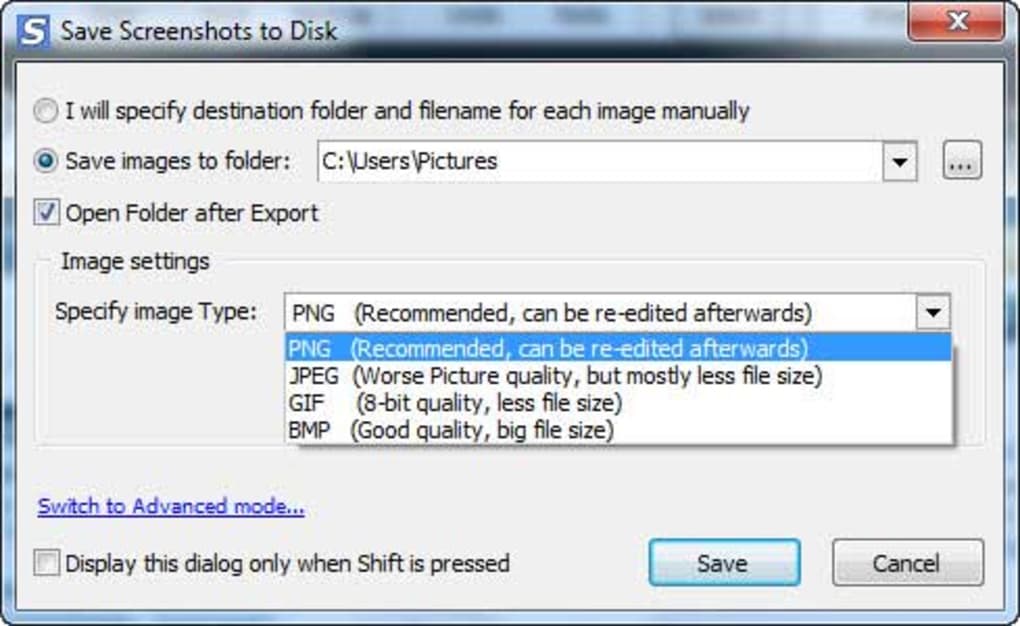
- Export options include PNG, JPEG, BMP, GIF, and PDF.
- Copy to clipboard for immediate pasting into documents or chats.
- Supports Chrome, Firefox, Edge, and Opera browsers.
- Free version available with optional paid upgrade for premium features.
Installing FireShot is straightforward. Open your browser’s extension store (Chrome Web Store, Firefox Add‑ons, or Microsoft Edge Add‑ons), search for “FireShot”, and click “Add to Chrome/Firefox/Edge”. After the download finishes, a small camera icon appears in the toolbar.
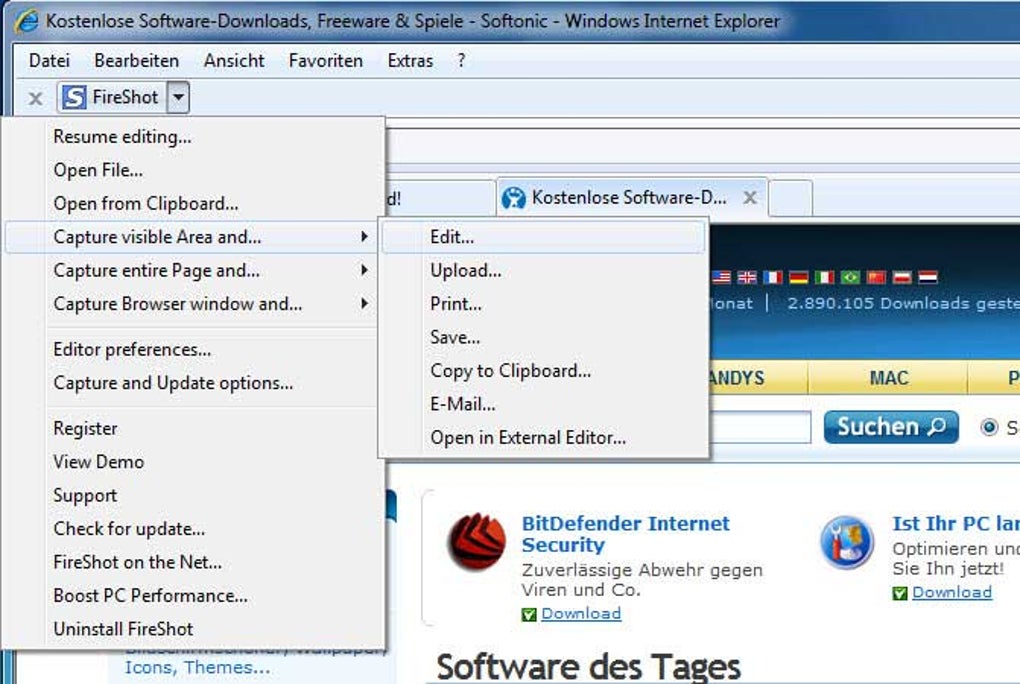
Clicking the icon or right‑clicking any page opens a context menu with capture options: “Capture Entire Page”, “Capture Visible Part”, and “Capture Selection”. Selecting an option triggers the capture, then automatically opens FireShot’s lightweight editor where you can annotate, crop, or blur sensitive data. When you’re satisfied, click “Save” to choose a format and destination folder, or “Copy” to place the image on your clipboard.
The entire process typically takes less than two seconds, making it perfect for rapid documentation during research, bug reporting, or tutorial creation.
Compatibility, Pros & Cons, and Real‑World Performance
FireShot works on all major desktop browsers that support extensions: Google Chrome (version 49+), Mozilla Firefox (version 45+), Microsoft Edge (Chromium‑based), and Opera. The extension runs on Windows 10/11, macOS 10.13+, and Linux distributions with compatible browsers. Mobile browsers currently do not support FireShot, so it remains a desktop‑focused solution.
Pros
- Extremely fast capture and annotation workflow.
- Zero‑bloat – the extension stays lightweight and does not slow down browsing.
- Multiple export formats, including PDF for document sharing.
- Free core version provides all essential screenshot functions.
- Stable performance on long, scroll‑heavy pages.
Cons
- No timed or delayed capture feature.
- Lacks cloud sync or automatic backup options.
- Basic editor does not include layers or an undo stack.
- Advanced image processing (e.g., OCR, smart detection) is absent.
- No native mobile support.
In everyday use, FireShot’s simplicity shines. Users report that even on pages with extensive scrolling, the extension captures the entire document without freezing the browser. The lack of advanced features may deter power users, but for most casual scenarios—saving lecture slides, annotating web tutorials, or capturing error messages—FireShot provides exactly what’s needed without a steep learning curve. The free tier is generous, and the optional premium upgrade unlocks higher‑resolution PDF output and additional export destinations for those who need a bit more flexibility.
FAQ & Conclusion – Is FireShot the Right Choice for You?
Can FireShot capture scrolling windows or dropdown menus?
Yes. The “Capture Entire Page” option automatically scrolls through the page and stitches the image together, handling long articles, forums, and even most dropdown menus that stay within the viewport.
Is there a limit to the number of screenshots I can save with the free version?
No. The free version imposes no hard limit on saved screenshots; you can capture and store as many images as your disk space allows.
How secure is the data I edit within FireShot?
All editing occurs locally in your browser. FireShot does not upload images to external servers unless you manually use a cloud service after export, ensuring your screenshots remain private.
Can I use FireShot on a corporate network with strict security policies?
Since FireShot is an extension that runs entirely within the browser, it typically complies with most corporate policies. However, administrators may need to whitelist the extension in the browser’s extension catalog.
What payment options are available for the premium upgrade?
The premium license can be purchased via credit card or PayPal directly from the FireShot website. The upgrade is a one‑time payment that unlocks additional export formats and higher‑resolution PDF generation.
FireShot delivers on its promise of fast, no‑frills screenshot capture. Its lightweight nature, straightforward UI, and reliable performance on long pages make it a top pick for everyday users who need a quick way to document web content. While it lacks some power‑user features, the free version is feature‑rich enough for most academic and professional tasks. If you value speed and simplicity over advanced editing, FireShot is definitely worth the download.
Conclusion: If you’re looking for a free, secure, and instantly accessible screenshot solution for Chrome, Firefox, or Edge, FireShot is a solid choice. Its quick capture modes, basic but effective annotation tools, and broad format support cover the core needs of students, educators, and office professionals. Download FireShot today, give it a spin, and decide for yourself whether its simplicity aligns with your workflow. For power users who need more advanced options, consider the premium upgrade or a dedicated screen‑capture suite, but for the majority of everyday scenarios, FireShot hits the sweet spot.







